A calendar with week numbers is one of the most efficient tools for organizing time, planning projects, and coordinating schedules across teams or households. Whether you’re managing multi‑phase work cycles, setting personal goals, or aligning events throughout the year, a week‑numbered layout provides clarity and consistency. For 2026, our high‑contrast black‑and‑white template is available as a free download, ready for printing and daily use.
Why Use a Calendar with Week Numbers?
Referencing weeks instead of vague date ranges (“mid‑April” or “around the end of Q3”) eliminates ambiguity. In professional environments, week numbers help teams across departments or time zones instantly understand the exact period you’re referring to. Freelancers, consultants, and managers benefit from faster planning, fewer misunderstandings, and smoother coordination of deliverables, meetings, and reviews.
Using week numbers also supports structured personal planning — from fitness routines to habit tracking — by giving each week a clear identity and rhythm.
ISO 8601 Week Numbering Explained
Most international organizations follow the ISO 8601 standard for week numbering. Under this system:
- Weeks begin on Monday.
- Week 1 is the week containing the first Thursday of the year.
- In 2026, Week 1 starts on Monday, December 29, 2025, and runs through Sunday, January 4, 2026.
- The year contains 52 full weeks, based on how the dates fall.
This standardized structure ensures that your planning aligns with global business conventions and digital calendar systems.
Features of the 2026 Black‑and‑White Template
- Annual Overview — All 52 weeks displayed on a single page for quick reference.
- Monthly Spreads — Each month has its own A4 page with week numbers clearly marked along the left margin.
- Note Areas — Spacious white sections for writing goals, reminders, or milestones.
- Ink‑Saving Design — A crisp black‑and‑white layout that prints cleanly and remains fully legible even when highlighted or color‑coded.
Download and Printing Instructions
- Choose your preferred format — PDF or DOCX — and click Download.
- Open the file in Adobe Reader or Microsoft Word.
- In your printer settings, select A4 paper and set scaling to 100%.
- Print the annual overview and monthly pages together or individually.
- Bind the pages with a ring binder, clip them together, or display them on a wall or board.
Practical Tips for Daily Use
- Place Within Easy View — Keep the calendar near your workspace, on the refrigerator, or in a clear desktop frame.
- Color‑Coding System — Assign colors for meetings, deadlines, personal tasks, and team sprints for instant clarity.
- Weekly Check‑Ins — Spend ten minutes every Monday reviewing last week’s progress and setting new priorities.
- Sticky Notes & Flags — Mark important deadlines or events without writing directly on the template.
Customization Options
- Company Branding — Add your logo or team name in the header using Word or PDF editing tools.
- Background Imagery — Insert subtle watermark graphics such as seasonal themes or motivational visuals.
- Personalized Sections — Create additional pages for yearly goals, quarterly checklists, or habit trackers that align with your week‑numbered planning system.
Benefits at a Glance
- Unified Time Reference — Everyone communicates using the same week‑based structure.
- Streamlined Project Management — Perfect for sprint planning, milestone tracking, and review cycles.
- Enhanced Personal Productivity — Supports routines, habit building, and long‑term goal monitoring.
- Free and Instant Access — No registration or fees — download and print immediately.
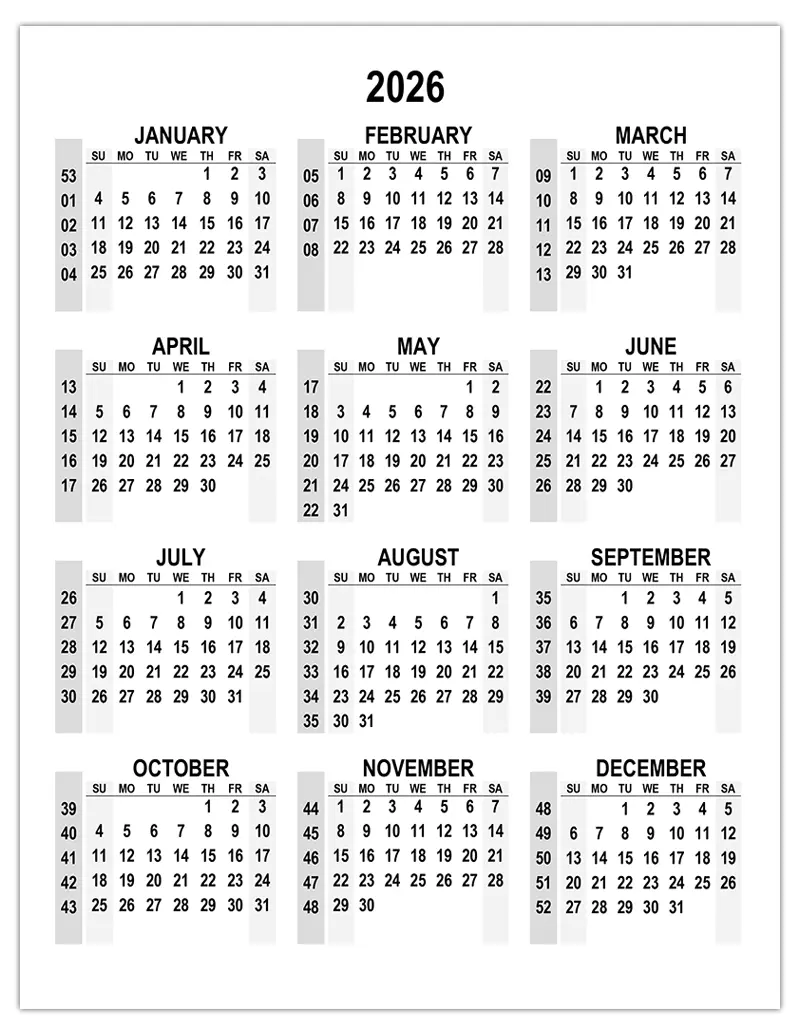
PDF | WORD
A 2026 calendar with week numbers transforms how you organize and visualize time. With a clean, ink‑efficient black‑and‑white template, you gain precision, flexibility, and efficiency in both professional and personal planning. Download your free copy, customize it to your needs, and enjoy a more structured and productive year.







Leave a Reply