The transition from the close of one year into the opening weeks of the next represents one of the most demanding periods on any schedule. December accelerates with a fast-paced blend of holiday gatherings, end-of-year corporate sprints, tax deadlines, and seasonal travel. Immediately following, January demands crisp goal setting, fresh operational momentum, and immediate execution.
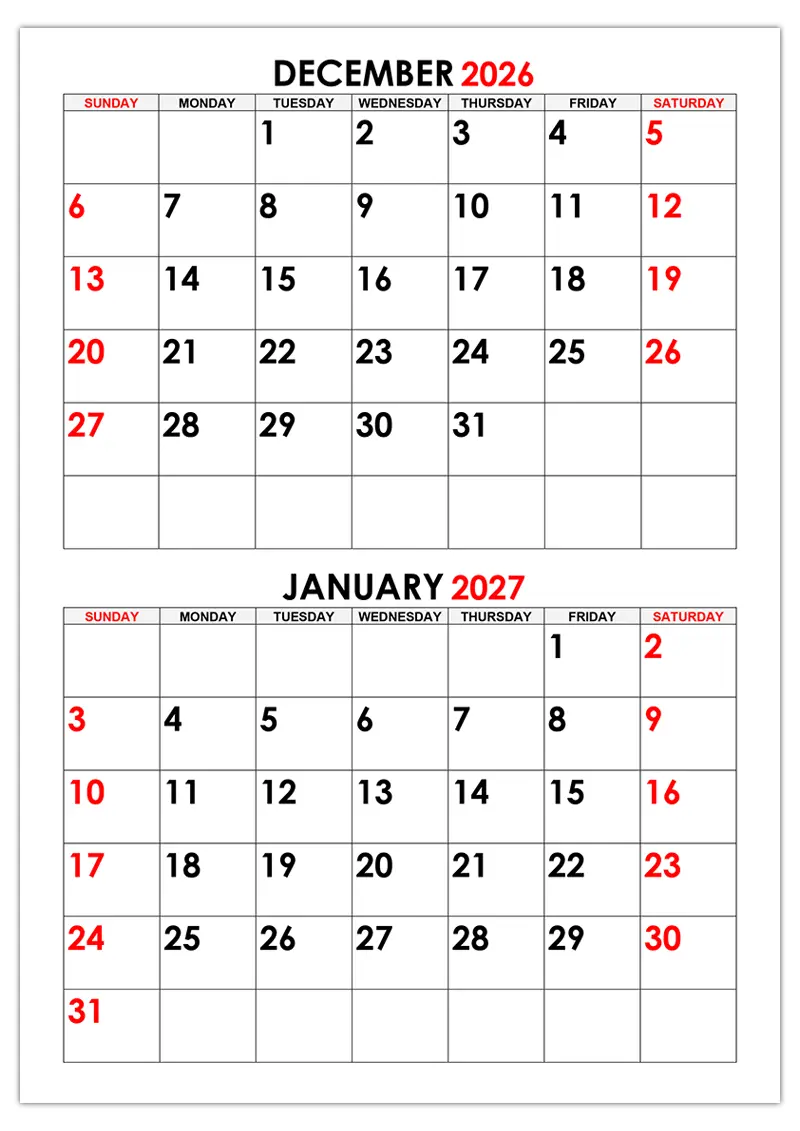
Managing this cross-year shift without missing critical commitments requires a smart layout strategy. A dual-month December 2026 – January 2027 vertical calendar template provides the ideal structural solution. By displaying these two critical months side-by-side on a single page, you gain continuous clarity across the entire holiday and new year bridge.
Why Choose a Dual-Month Vertical Layout?
Traditional single-month calendar pages force you to flip back and forth, frequently hiding upcoming deadlines that sit just across the year-end border. A continuous two-month vertical format eliminates this friction entirely.
Key Visual & Workflow Advantages
- 🔁 Seamless Continuity: Track late-December project deliverables alongside early-January launch milestones without breaking your visual context.
- 🎯 Unified Focus: Clear vertical division keeps individual days organized while displaying a complete 60-day strategic view.
- ⚡ Immediate Clarity: Perfect for busy modern workplaces, freelance schedules, and active households where multi-week projects routinely span across the new year mark.
Format Breakdown: Matching Tool to Workflow
Every planning routine requires specific functional features. To support both digital-first workflows and tactile paper planning, two versatile template formats are available.
| Feature | Printable PDF Edition | Editable Word Format (.docx) |
| Primary Purpose | Instant printing, wall hanging, desk display | Complete digital customization & dynamic editing |
| Layout Stability | Preserves exact grid dimensions & typography | Flexible layout, table adjustments, and font scaling |
| Customization | Manual (pens, highlighters, stickers) | Digital (custom fonts, cell shading, inserted icons) |
| Ideal For | Pinboards, fridge displays, command centers | Team project tracking, client schedules, shift planning |
📄 Printable PDF Edition
Pre-formatted to scale cleanly on standard Letter and A4 paper sizes. Designed with high-contrast gridlines and sharp typography, it serves as an excellent physical reference for home command centers, office bulletin boards, or desk mats.
📝 Editable Word Edition (.docx)
For those who prefer organizing details digitally before printing, the Microsoft Word template grants full flexibility. Adjust line spacing, add custom background shading, incorporate company logos, or type recurring commitments directly into the grid.
Proven Strategies for Strategic Year-End & New Year Planning
Having a functional template is the foundation; establishing a structured planning habit ensures optimal results. Use these practical steps to optimize your December 2026 and January 2027 planner:
1. 🎨 Implement Purposeful Color-Coding
If you choose the editable digital version or use highlighters on the printed copy, assign specific visual categories to organize your time at a glance:
- 🟦 Blue: Primary business deliverables, client meetings, and project sprints
- 🟩 Green: Health routines, fitness goals, personal appointments, and rest days
- 🟥 Red: Non-negotiable tax, legal, financial, or billing cutoffs
- 🟨 Yellow: Seasonal holidays, social events, travel windows, and family celebrations
2. 📌 Map Key Milestones Ahead of Time
In late November 2026, take 15 to 20 minutes to populate all confirmed dates across both months. Pre-mark corporate holiday closures, travel schedules, account cutoffs, and family gatherings so your routine weekly work naturally fits around them.
3. ⏱️ Maintain a Weekly 5-Minute Review
Schedules change fast. Dedicate five minutes every Sunday evening to review the upcoming seven days spanning December and January. Realign shift hours, confirm upcoming appointments, and cross off completed action items.
Frequently Asked Questions
How does a two-month template compare to a full annual calendar?
A two-month vertical layout offers significantly larger daily grid boxes than a 12-month poster page. This gives you plenty of space to write detailed daily schedules while maintaining clear visibility into the upcoming month.
Can I print this template on custom paper sizes?
Yes. When printing the PDF file, choose “Fit to Printable Area” or “Custom Scale” in your printer dialog to adjust the template cleanly for Legal, Executive, or A3 paper sizes without losing grid proportion.
Is this dual-month layout effective for project management?
Extremely. The uninterrupted vertical transition between December 2026 and January 2027 makes it ideal for managing year-end sprints, tracking shift coverage over holiday periods, and mapping Q1 product rollouts.
Start Planning Your 2026–2027 Transition Today
Taking command of your cross-year schedule early reduces stress during the busy holiday season and sets a clear, organized foundation for the start of 2027. Select your preferred format to get started:
[ Download PDF Version ] | [ Download Editable Word Version ]
Related Posts:
- Calendar for November, December 2026, January 2027
- Calendar for December 2025, January 2026

- Calendar for December 2026

- Calendar for December 2026, January, February 2027
- Calendar for January 2027

- Excel calendar
- Calendar for November, December 2025, January 2026

- Calendar for December 2025, January, February 2026

- New year stencils

- Calendar for November, December 2026

- Calendar for November, December 2025

- Calendar for October 2026

Leave a Reply